Pages

Senin, 01 November 2010

Sistem operasi yang yang bisa digunakan pada Microsoft Virtual PC umumnya itu berasal dari teman dekatnya sendiri, yaitu "Microsoft".Misalnya Windows 98, XP, Vista,


Kelemahan komputer Virtual ini, adalah tidak didukungnya USB drive oleh virtual PC.
Ohh iya teman-teman, sekarang Aku bakal melakukan demo pada platform windows XP SP2 nihh....


Sebelum memulai Aku ingetin nieh, yang disebut Guest itu adalah operating sistem pada virtual PC sedangkahn Host adalah operating sistem asli/utama kalian.


  Ayo ikutin langkah-langkah dibawah ini :
  1. Download Microsoft Virtual PC 2007 SP1
    Di download dari http://www.microsoft.com/windows/downloads/virtualpc/default.mspx
  2. Setelah selesai mendownload, segera install ya!!! Langkah-langkah instalasiinya tidak begitu sulit.. (tinggal klik saja tombol Next sampai selesai.)
  3. Cara menjalankan Microsoft Virtual PC sangat mudah, caranya 
    Start –> Program –> Microsoft Virtual PC
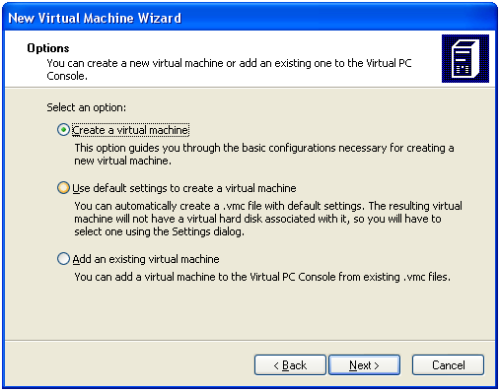
  4. Temen-temen akan mendapatkan Wizard seperti dibawah ini (lalu Klik aja next)

  5. Setelah itu, pilih 'create virtual machine' (lalu klik next)
  6. Pilih sebuah nama untuk guest OS kita!!! Namanya bebas tapi saya contohkan“WinXP Test Platform” (setelah itu, klik next)

  7. Karena Aku mau menginstall windows, maka aku memilih windows XP dari drop down list.
  8. Adjust RAM menjadi 512 MB. Defaut RAM yang hanya 128 MB sangat kurang.


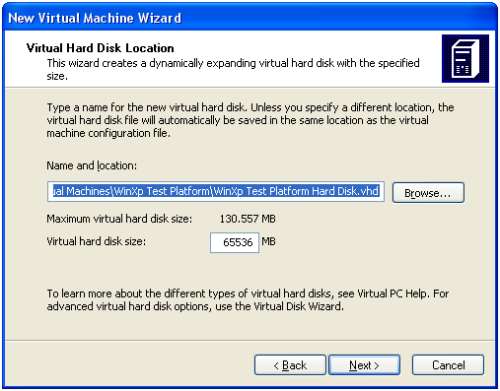
  9. Berikutnya temen-temen akan membuat sebuah Harddisk untuk Guest OS. Bentuk fisik dari HDD ini sebenarnya cuman sebuah file. Tentu saja ukuran filenya bisa besar sekali bisa-bisa lebih dari 2 giga bila seluruhnya telah diinstall. Pilihlah “new virtual disk”, default setting yang memberi ukuran hdd virtual sebesar 60 giga byte telah sangat memadai.
  10. Wizard selesai, klik aja finish. Berikutnya adalah memasukkan Windows XP CD kedalam CD Rom drive dan start virtual machine.
  11. Pastikan CD windows XP berada pada cdrom drive, dan start virtual machine. Ada 2 cara menjalankan virtual machine. Pertama dengan cara mengklik virtual machine file (*.vmc) atau Klik start pada Virtual PC Console.


  12. Lakukan instalasi,seperti biasa (bagaimana cara menginstalasi windows XP diluar dari tutorial ini). Coba lakukan googling bila ingin mendapatkan tutorialnya.


  13. Setelah OS terinstall dan kita dapat boot kedalam, kini waktunya untuk menambahkan sebuah Virtual Machine Additions. 


    Klik pada menu Action dan pilih “Install or Update Virtual Machine Additions”. Temen-temen akan mendapatkan warning, klik saja continue dan lakukan install. Setelah installasi selesai, restart system.
    Note: Bila kalian merasa cursor mouse terjebak dalam OS Guest (tidak bisa move ke OS Host) tenang saja ya!ttemen-temen tekan saja tombol ALT yang disebelah kanan keyboard (jangan yang kiri!).

  14. SELAMAT!! Kalian Telah selesai membuat KOMPUTER VIRTUAL PC...!!! <img alt=


    Nah.. sekarang Aku kasih tau dasar-dasar manipulasi file.

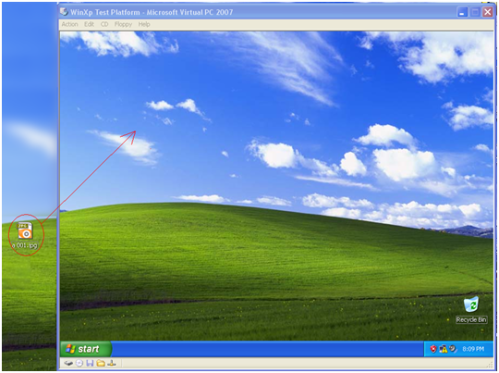
  15. Untuk mengcopy sebuah file dari host ke guest, klik dan drag sebuah file dari desktop/folder ke dalam virtual pc seperti gambar dibawah ini. Lakukan juga Hal yang sama bila kalian ingin mengcopy dari guest ke host.
  16. Kelemahan dari cara diatas adalah bila kalian ingin mengupdate file pada guest kemudian perubahan ini ingin juga diimplementasikan pada host maka kalian akan sering click and drag. Cara lain yang lebih baik adalah membuat sebuah shared folder. Langkahnya adalah sebagai berikut:
    1. Klik edit -> setting

    2. Ke pilihan shared folder lalu buat sebuah share folder
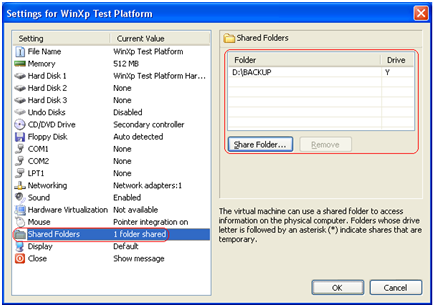
    3. Untuk mengakses shared folder, Temen-temen gunakan saja windows explorer pada guest operating system dan browse ke dari Y (atau drive letter lainnya bergantung dari mapping).

  17. Menu setting juga bisa digunakan untuk mengedit nilai-nilai lain seperti besar memory etc.
Note:
  1. USB Drive tidak didukung oleh virtual PC!
  2. Ukuran file virtual PC itu cukup besar lohh!! bahkan sudah mencapai 1,4 gb padahal baru windows yang diinstall.
Nahhhh..Sekian tutorial dari saya, Selamat Mencoba plendt!!!!!

Langkah-langkah membuat CD Virtual

 Pengertian
 
Microsoft Virtual PC adalah sebuah program virtualisasi yang dijalankan di atas komputer PC berbasis sistem operasi Microsoft Windows dan juga dapat dijalankan di atas komputer Apple Macintosh berbasis sistem operasi Mac OS. Aplikasi ini pada awalnya ditulis oleh Connectix, yang kemudian diakusisi oleh Microsoft Corporation. Pada bulan Juli 2006, Microsoft merilis Virtual PC untuk Windows sebagai sebuah versi yang gratis (tidak berbayar), dan pada bulan Agustus 2006, Microsoft mengumumkan bahwa Virtual PC untuk Macintosh akan dihentikan produksinya, karena Microsoft tidak melakukan porting aplikasi dari prosesor IBM PowerPC (yang sebelumnya digunakan oleh Macintosh) menjadi prosesor berbasis Intel.

Ini lah langkah-langkahnya :


Langkah Pertama
Masukan CD, lalu  Klik pada ikon Alkohol 52%


Langkah kedua
Apabila seperti gambar di bawah ini, maka CD ROM sudah masuk.


Langkah ketiga
Ketikan nama yang diinginkan di Image Name.


Langkah ke empat
Tunggu instalasinya.


Langkah ke lima

Kamis, 14 Oktober 2010

this is UTS time ...

hai gals ...
kalian pada tau gak ??
minggu ini tuh sebener.y lagi UTS gitu deh ..
Tapi zhie malah buka Blog kaya gini ...
hhahhaa ...
but, it's okay ..
refreshing aja kali ...
daripada Bad mood gara-gara UTS ...
iahh seneng-seneng dikit gak papa juga kali iaa ...
tapi tetep jangan lupa buat BELAJAR !!!
manage your time okay ...

Rabu, 06 Oktober 2010

heeiii miss shopaholic ..

heii ..
kali ini ..
aku mo promosi tas gitu deh ..
dari mulai tas sekolah sampe buat tas leviiiiiii .....
hhhahhhahhaaa
so .. buat kamu-kamu yang mau pesen bisa kontak aku di siniii ...
okaaaaaaayyyyyyyyyyyyyyy !!!!!!


ditunggu lhooo ...
buat foto-foto tasnya ntar nyusul deh ...
siph ...

Selasa, 28 September 2010

The Advantages & Disadvantages of The Internet:

From : Pondered.org --> Business And Technology --> The Advantages & Disadvantages of The Internet

The Internet or the World Wide Web is indeed a wonderful and amazing addition in our lives. The Internet can be known as a kind of global meeting place where people from all parts of the world can come together. It is a service available on the computer, through which everything under the sun is now at the fingertips of anyone who has access to the Internet.
To get ‘online’, meaning to connect to the Internet, you need to have:
  • A Computer: Computer equipment is a sizeable investment and thus you should select a computer carefully. Before buying a computer, understand your needs and then choose one accordingly. See that it comes with a warranty and that after sales service is available in case you need it.
  • Internet Service Provider: This is the software that you will require to get online. You can now choose from a dial-up service or 24-hour broadband services. This is the service that will help you to connect to the Internet and start your surfing experiences.

Advantages of the Internet

The Internet provides opportunities galore, and can be used for a variety of things. Some of the things that you can do via the Internet are:
  • E-mail: E-mail is an online correspondence system. With e-mail you can send and receive instant electronic messages, which works like writing letters. Your messages are delivered instantly to people anywhere in the world, unlike traditional mail that takes a lot of time.
  • Access Information: The Internet is a virtual treasure trove of information. Any kind of information on any topic under the sun is available on the Internet. The ‘search engines’ on the Internet can help you to find data on any subject that you need.
  • Shopping: Along with getting information on the Internet, you can also shop online. There are many online stores and sites that can be used to look for products as well as buy them using your credit card. You do not need to leave your house and can do all your shopping from the convenience of your home.
  • Online Chat: There are many ‘chat rooms’ on the web that can be accessed to meet new people, make new friends, as well as to stay in touch with old friends.
  • Downloading Software: This is one of the most happening and fun things to do via the Internet. You can download innumerable, games, music, videos, movies, and a host of other entertainment software from the Internet, most of which are free.

Disadvantages of the Internet

There are certain cons and dangers relating to the use of Internet that can be summarized as:
  • Personal Information: If you use the Internet, your personal information such as your name, address, etc. can be accessed by other people. If you use a credit card to shop online, then your credit card information can also be ‘stolen’ which could be akin to giving someone a blank check.
  • Pornography: This is a very serious issue concerning the Internet, especially when it comes to young children. There are thousands of pornographic sites on the Internet that can be easily found and can be a detriment to letting children use the Internet.
  • Spamming: This refers to sending unsolicited e-mails in bulk, which serve no purpose and unnecessarily clog up the entire system.
If you come across any illegal activity on the Internet, such as child pornography or even spammers, then you should report these people and their activities so that they can be controlled and other people deterred from carrying them out. Child pornography can be reported to:
  • Your Internet service provider
  • Local police station
  • Cyber Angels (program to report cyber crime)
Such illegal activities are frustrating for all Internet users, and so instead of just ignoring it, we should make an effort to try and stop these activities so that using the Internet can become that much safer. That said, the advantages of the Internet far outweigh the disadvantages, and millions of people each day benefit from using the Internet for work and for pleasure.

Miss Remidial ??? Ohh nooooo !!!!

Hallo ...
This is me "zhie"
hmpf awal masuk sekolah semester ini itu bisa dibilang kacau ...
Kenapa ?????
Karena eh karena di awal-awal ulangan semua nilai pada jeblog alias nilai merah gitu deehh ..
dan kalo terus-terusan kaya gitu bisa-bisa status zhie berubah ...
Dari tadinya pelajar jadi "MISS REMIDIAL" ...
ffuuuhhh jangan sampe deh ..
makanya sekarang zhie lagi ngadain tahap-tahap perubahan ...
iaahhh moga aja bisa berhasil ...
dan seenggaknya nilai zhie gak ada yang ampe di REMIDIAL segala  lah ...
doain iaa teman-teman ...
hhhahhhaa ....